
Assistive Technology
Assistive Technology (AT)
Assistive Technology (AT) in education refers to the range of tools, devices, and strategies that enhance access, participation, and learning outcomes for students with neurodiverse profiles. AT plays a vital role in reducing learning barriers and enabling all learners to engage with the curriculum in ways that reflect their individual strengths and needs. The World Health Organization (WHO) and UNICEF (2022) highlight that access to assistive technology for children with disabilities is often the first step toward inclusive childhood development, as these tools foster autonomy, communication, and meaningful participation in everyday learning.
Expanding on this, UNICEF (2022) and other global frameworks categorize assistive technologies into three broad types as low-tech, mid-tech, and high-tech.
Assistive Technology Tools
Low-tech tools
Communication books, symbol charts, visual schedules, and graphic organizers are low-cost, easy to use, and require minimal maintenance.
Mid-tech tools
Includes adaptive keyboards, talking calculators, and simple battery-operated communication aids that may involve limited electronic components.
High-tech tools
Advanced digital systems such as tablets, speech-generating devices, or eye-gaze technologies that often require specialized training and resources.
While high-tech innovations can provide sophisticated support, research suggests that low- and mid-tech AT tools are the most practical, cost-effective, and sustainable options for Sri Lankan classrooms. These tools can be created or adapted using locally available materials and integrated seamlessly into everyday teaching and assessment practices.
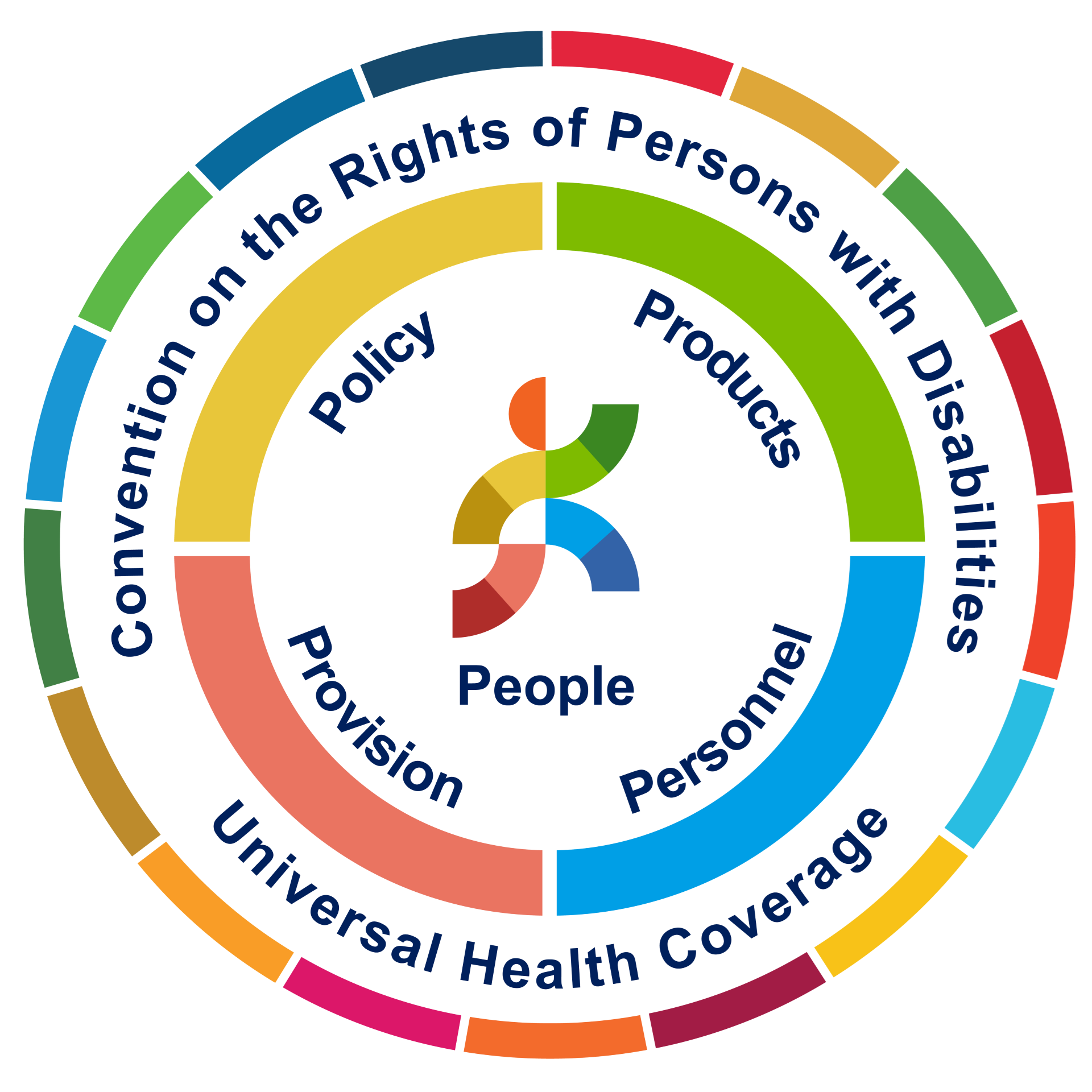
Globally and regionally, access to assistive technology is guided by the 5Ps Framework developed by the World Health Organization; People, Policy, Products, Provision, and Personnel. This framework provides a holistic approach to building inclusive education systems. For Sri Lanka, the 5Ps model offers a roadmap to strengthen AT access through improved teacher training, policy implementation, and the local development of affordable assistive products that meet diverse learner needs across both rural and urban settings.
How AT Supports Learning in the Classroom
AT is more than just a tool, it is a bridge to independence. By providing tailored support, AT empowers students to overcome barriers and reach their full academic potential.
Organizing Schoolwork
Helps students stay on top of assignments and deadlines through structured digital systems.
Time Management
Enables students to plan study sessions and break large projects into achievable steps.
Note-Taking & Writing
Word prediction and speech-to-text tools allow students to communicate ideas clearly and efficiently.
Improving Focus
Minimizes distractions to help students concentrate on reading, writing, and core tasks.
Reading Support
Text-to-speech programs improve comprehension and engagement for students with reading challenges.
Memory & Study Aids
Organizes and highlights key information to support exam preparation and retention.
Math Assistance
Visualizes and solves complex mathematical problems with greater independence.
Addressing Practical Challenges
AT “Burnout”
Occurs when students are overwhelmed by technology.Consistent guidance is required to ensure tools adapt to their unique needs.
Accessibility Limits
While tablets and Chromebooks are powerful, they may not meet the deep accessibility requirements of every individual learner.
Generic Implementation
A “one-size-fits-all” approach lacks the personalized instruction necessary to make AT truly effective for specific needs.
AT Tools for Classroom
Within this section of StepAhead, you will find information and infographics on a range of Low-Tech and Mid-Tech AT tools, along with step-by-step visual guides showing how each can be used in the classroom. These resources aim to empower teachers to make small, practical changes that lead to meaningful improvements in student participation, confidence, and learning outcomes.
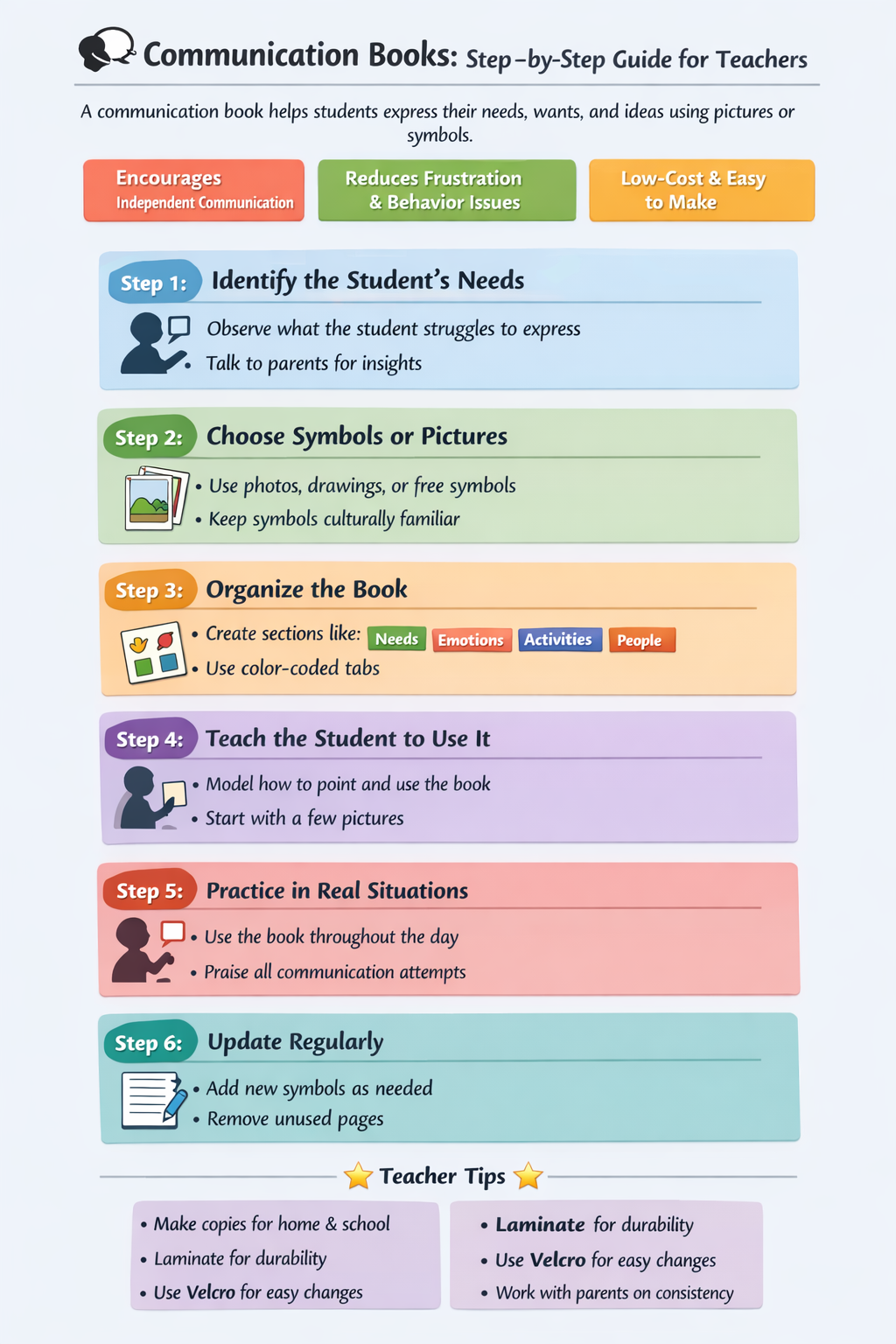
Communication Books
Allow students to express their needs, thoughts, and choices using pictures, symbols, or words, supporting those with limited verbal communication.
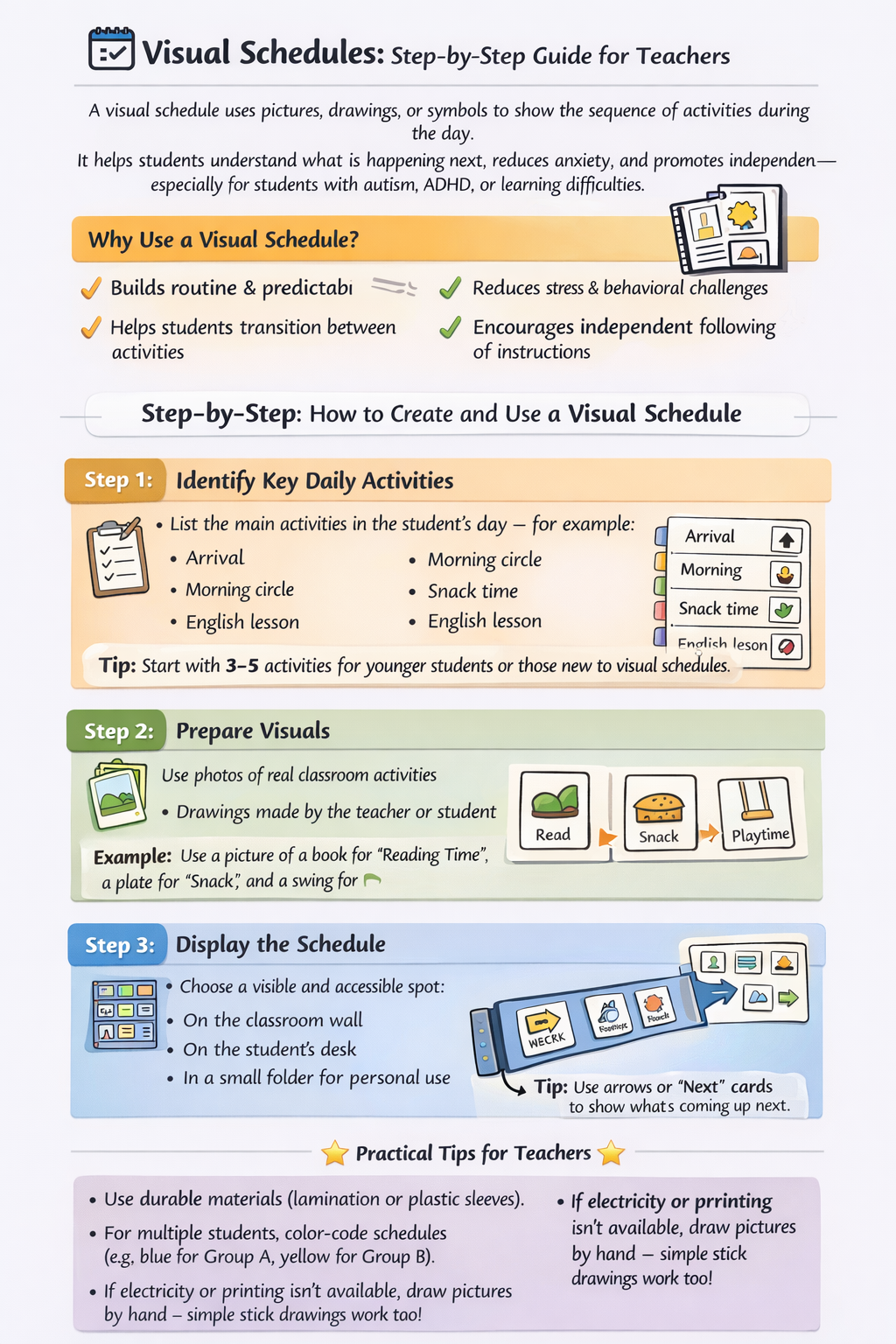
Visual Schedule
Displays daily activities or steps in a task through pictures or text, helping students understand routines and transitions more easily.
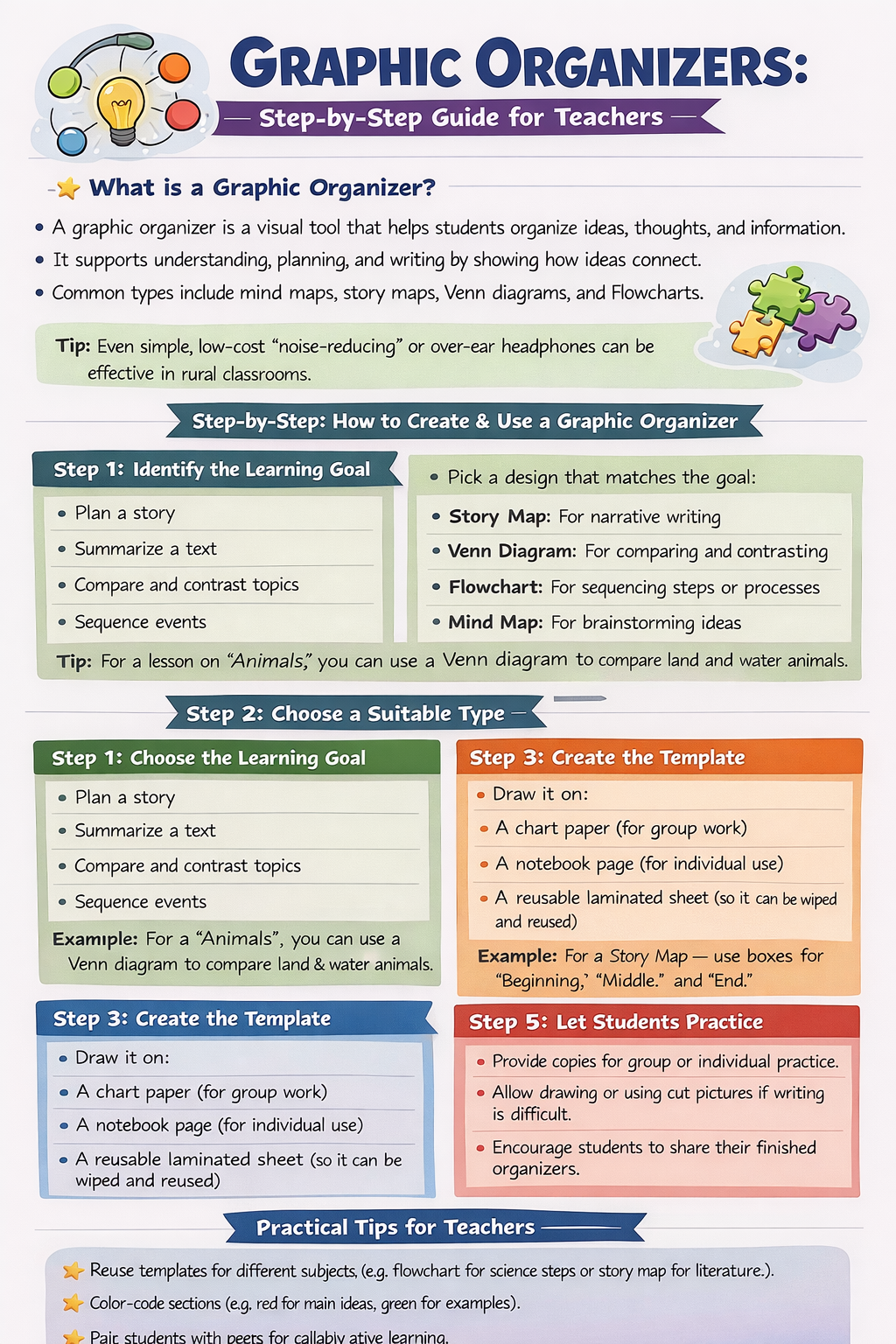
Graphic Organizers
Provide visual frameworks for organizing ideas and information, improving understanding, planning, and writing skills.
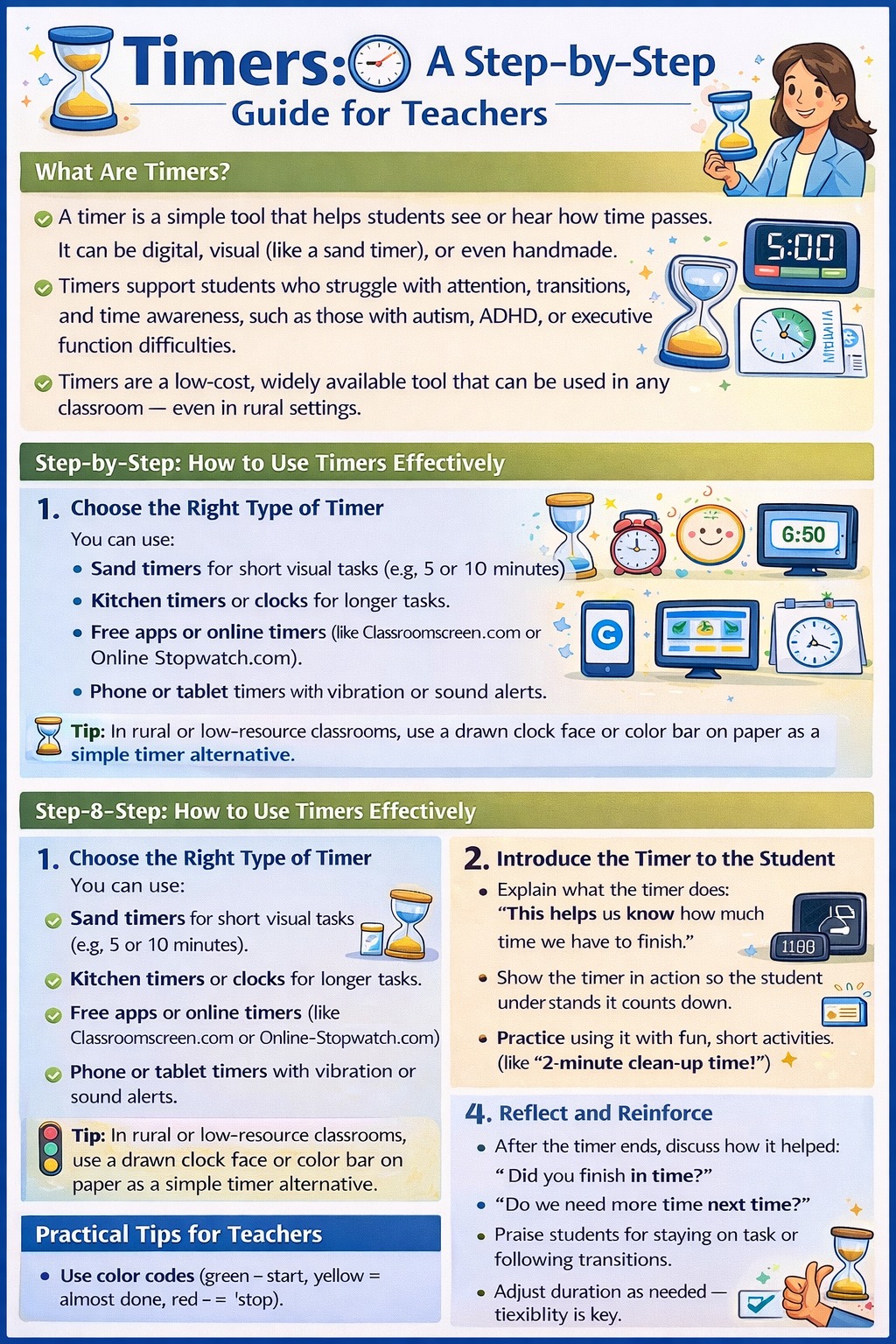
Timers
Help students manage time and stay focused by showing how long they have for a task or break.
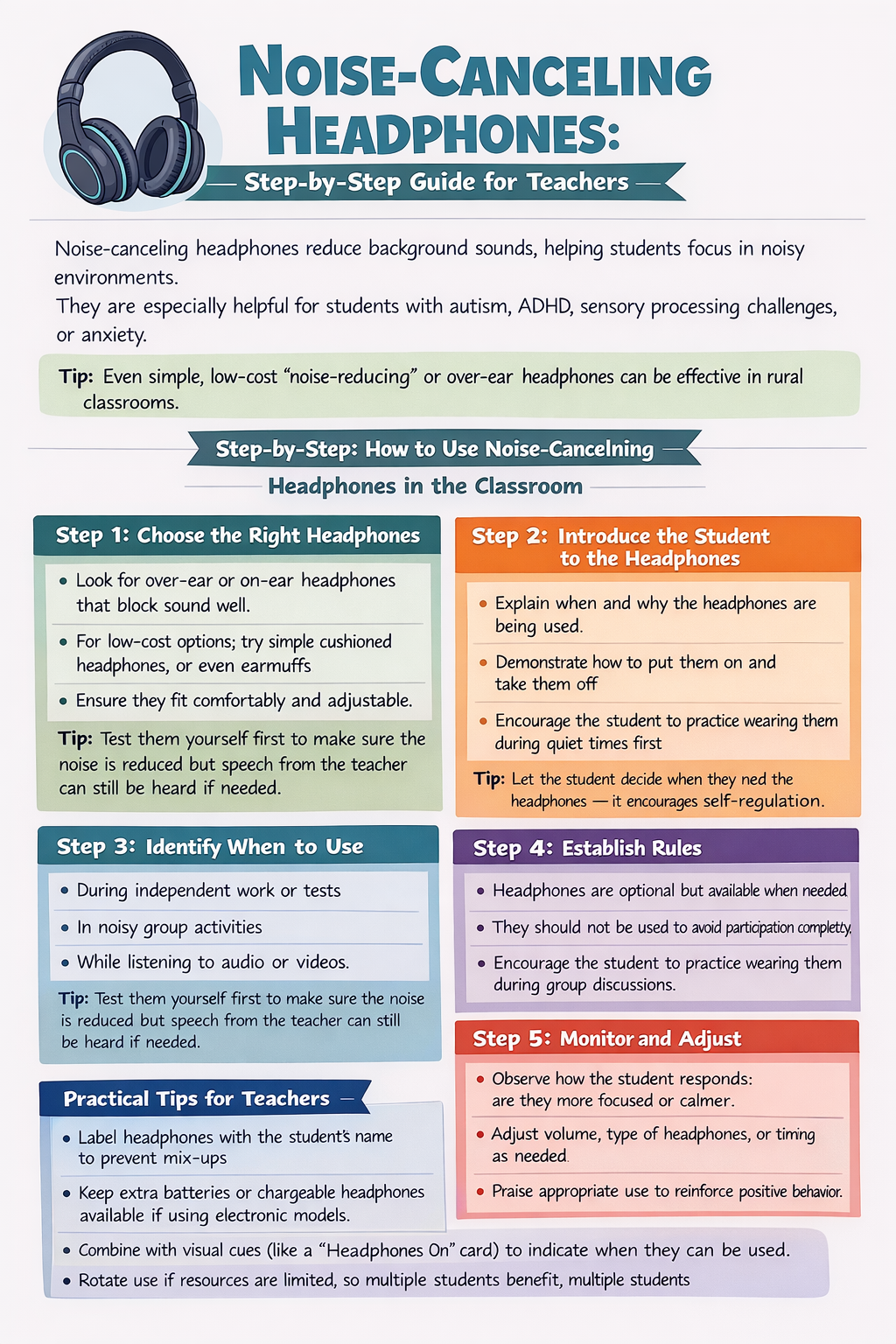
Noise-Cancelling Headphones
Reduce background noise and distractions, helping students concentrate and stay calm in noisy environments.
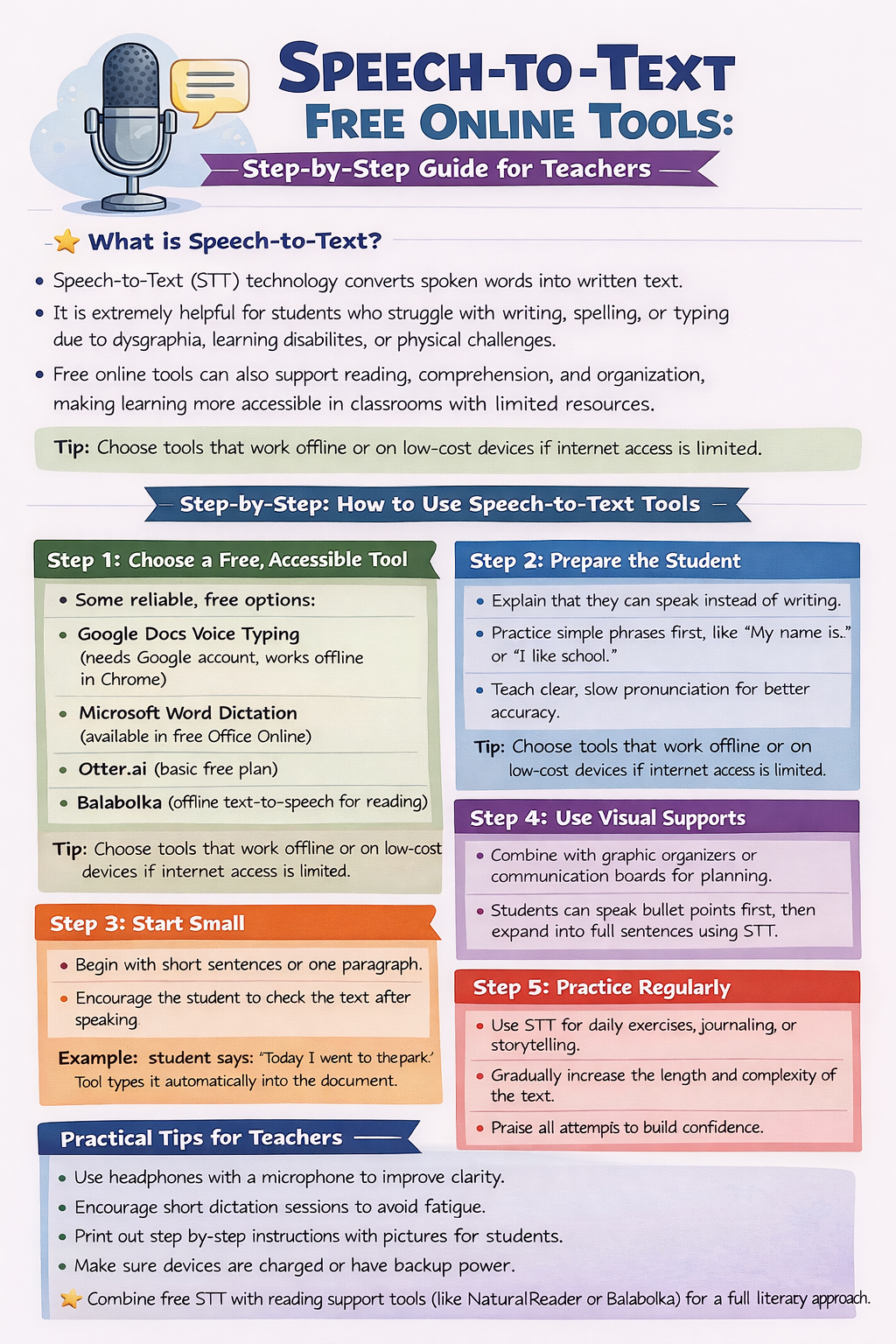
Speech-to-Text
Converts spoken words into written text, reducing the need for handwriting and supporting students with difficulties in writing or typing.
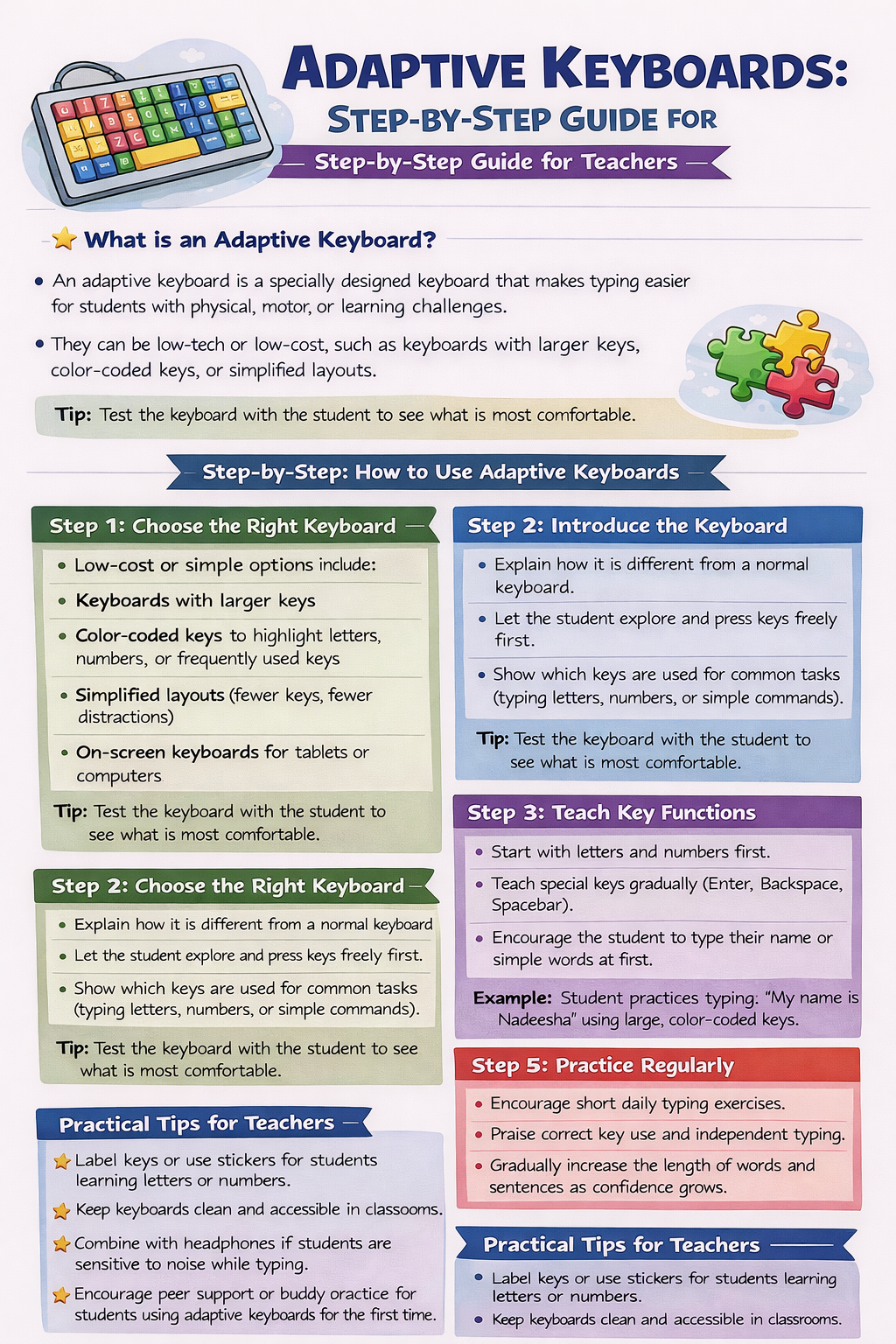
Adaptive Keyboards
Feature customized layouts, larger keys, or alternative input methods to make typing easier for students with physical or motor challenges.
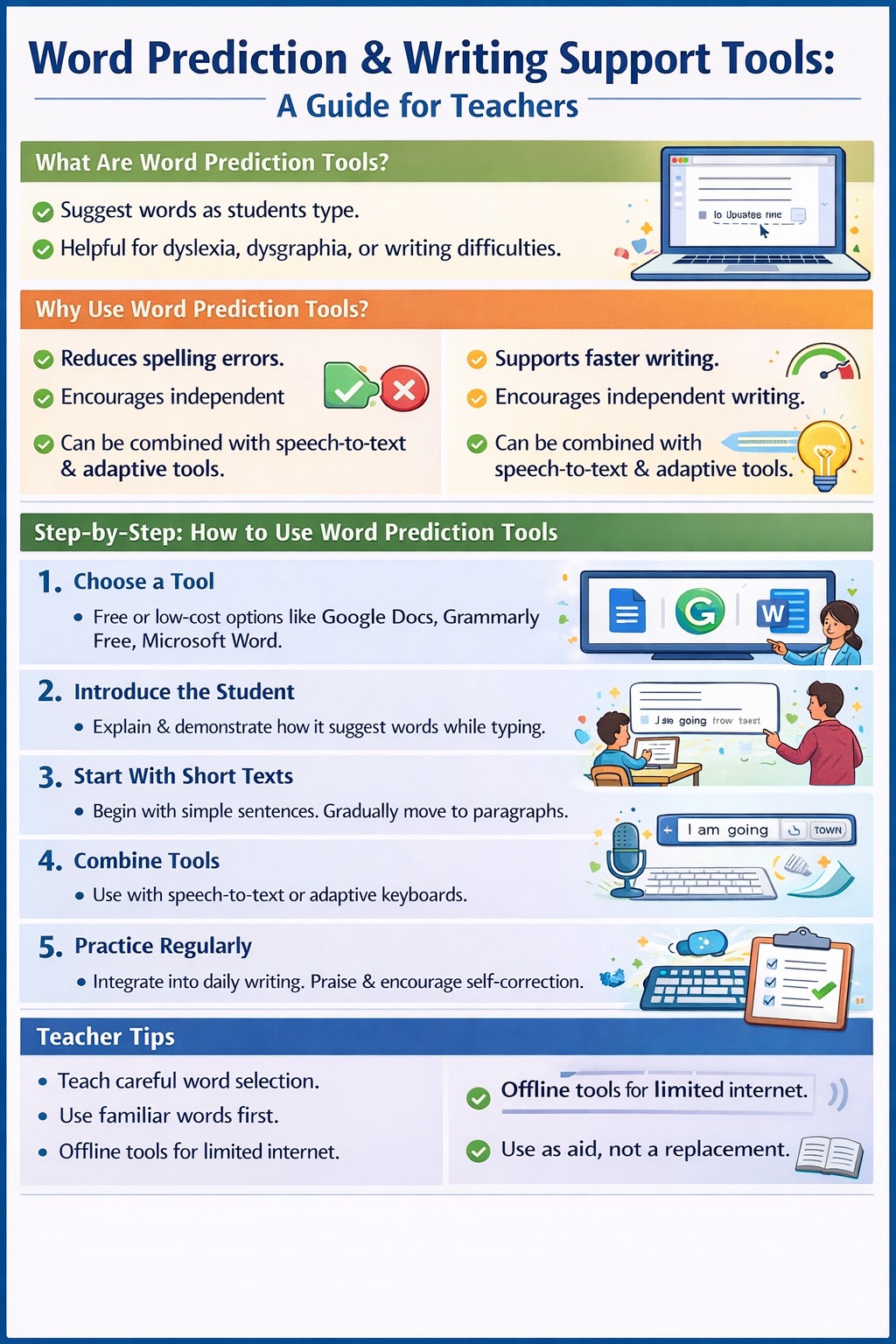
Word Prediction and Writing Support Tools
Suggest words as students type and offer spelling or grammar support, helping improve writing fluency and accuracy.
Strategies for Self-Regulation
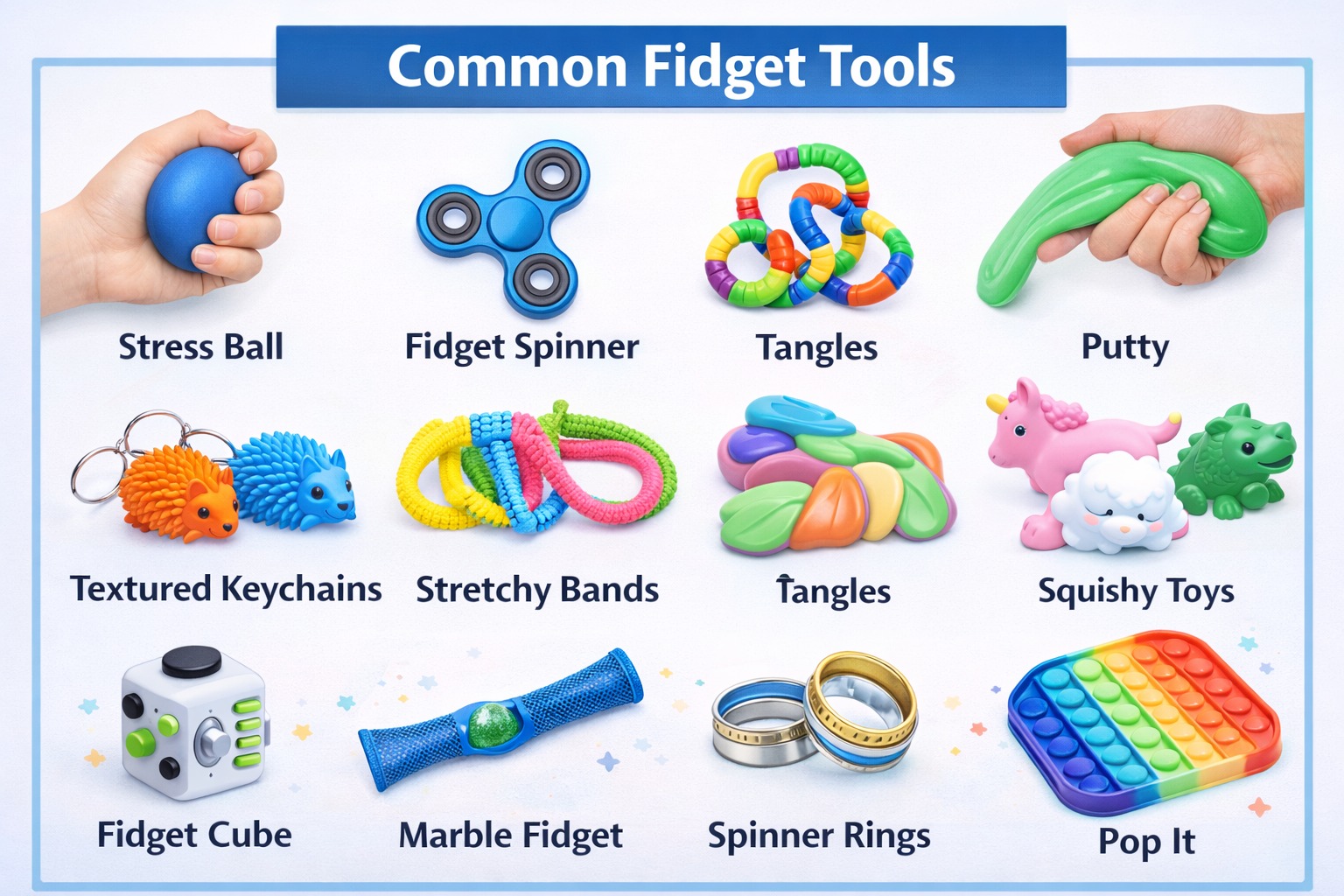
Fidget Tools
Fidget tools are small, handheld objects that help students focus, manage sensory needs, and release excess energy in appropriate ways. Examples include stress balls, fidget spinners, tangles, putty, textured keychains, and stretchy bands. When used thoughtfully, fidget tools can improve attention, reduce anxiety, and support students who struggle with sitting still or maintaining focus such as those with ADHD or sensory processing differences.
Teachers can guide effective use by introducing fidget tools intentionally, setting boundaries for when and how they’re used, and choosing tools that are quiet and non-distracting. The goal is to support self-regulation and concentration without interrupting classroom learning.
Calming Strategies
Calming strategies are techniques that help students manage stress, emotions, and sensory overload. These strategies teach self-awareness and emotional control, empowering students to respond to challenges in positive ways.
Common calming strategies include:
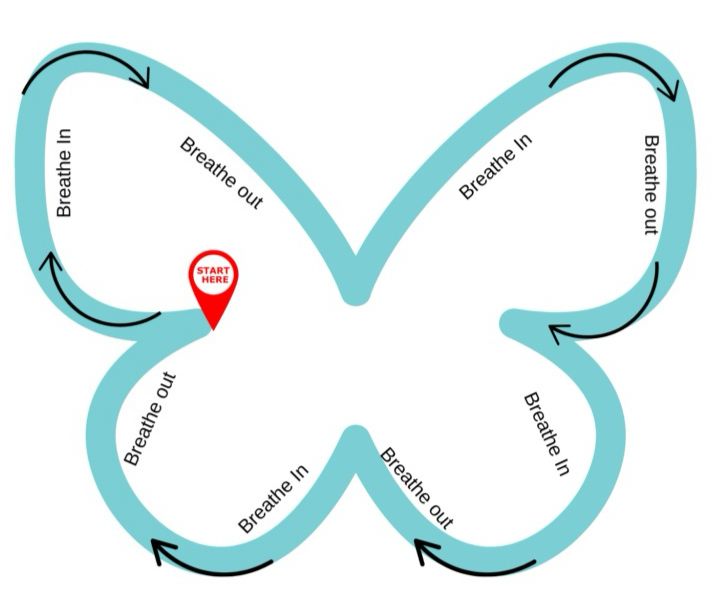
Butterfly Breathing – Imagining or tracing a butterfly’s wings while slowly inhale and exhale to feel calm and centered.
Rainbow Breathing – Imagining or tracing a rainbow in the air while inhaling and exhaling to promote calmness.
Five-Finger Breathing – Tracing each finger with the opposite hand while breathing in and out to focus and ground attention.
Progressive Muscle Relaxation – Tensing and relaxing muscles to release physical stress.
Mindful Listening or Visualization – Focusing on sounds or mental images of calm places to settle the mind.
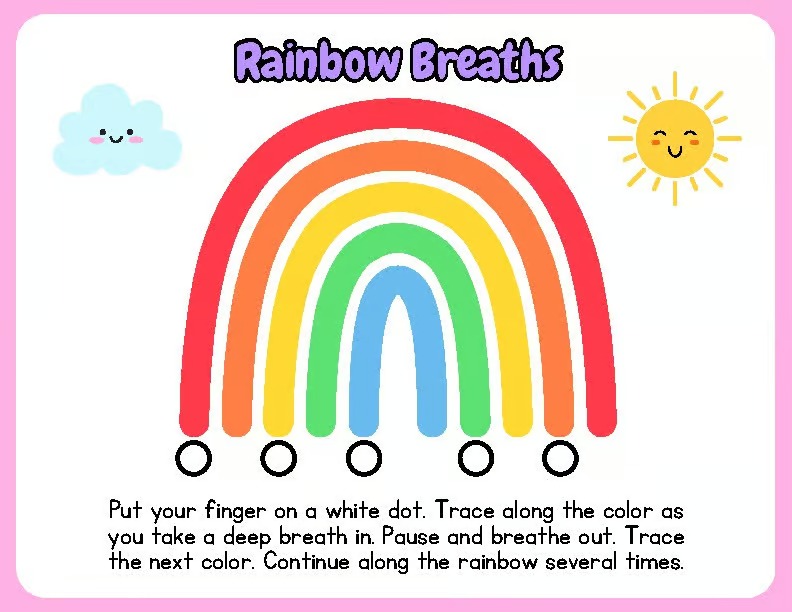
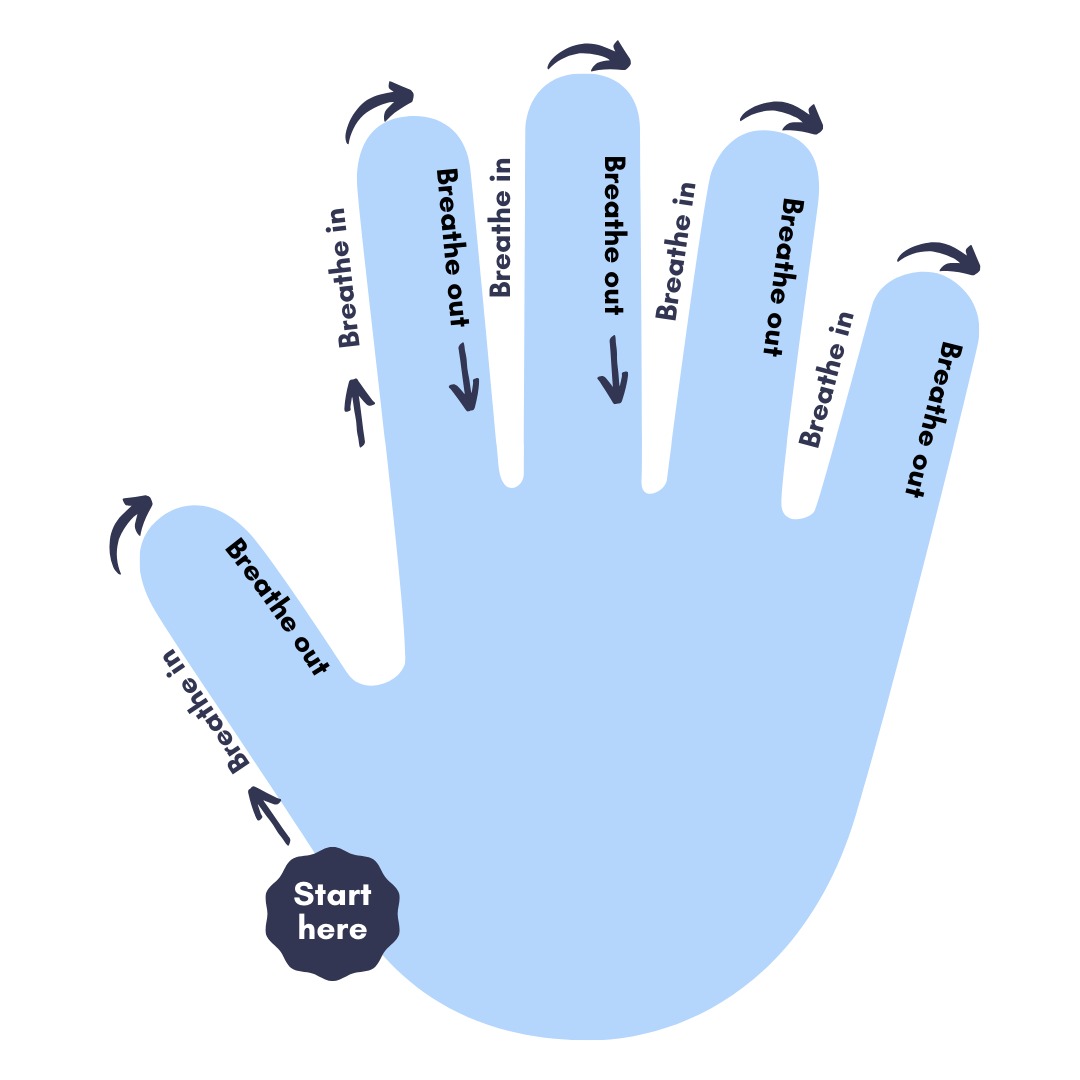
By incorporating these practices into the classroom routine, teachers can create a supportive, emotionally safe environment that encourages self-regulation, focus, and a positive mindset for all learners.
Integrating AT Tools into Sri Lankan Classrooms through Case Studies
Following the introduction to various AT tools, this section presents illustrative case studies that demonstrate how these tools can make a meaningful difference in supporting neurodiverse learners in Sri Lankan classrooms. While these are not real classroom cases, they are based on realistic and culturally relevant scenarios that reflect common teaching contexts across the country. Each story shows how low-tech and mid-tech AT tools can be integrated into everyday lessons to enhance participation, communication, and assessment.
The case studies are designed to help teachers bridge theory with practice, offering practical examples of how assistive strategies can be adapted within local classrooms to create more inclusive and empowering learning environments for all students.
Sahan’s Story
Classroom Story
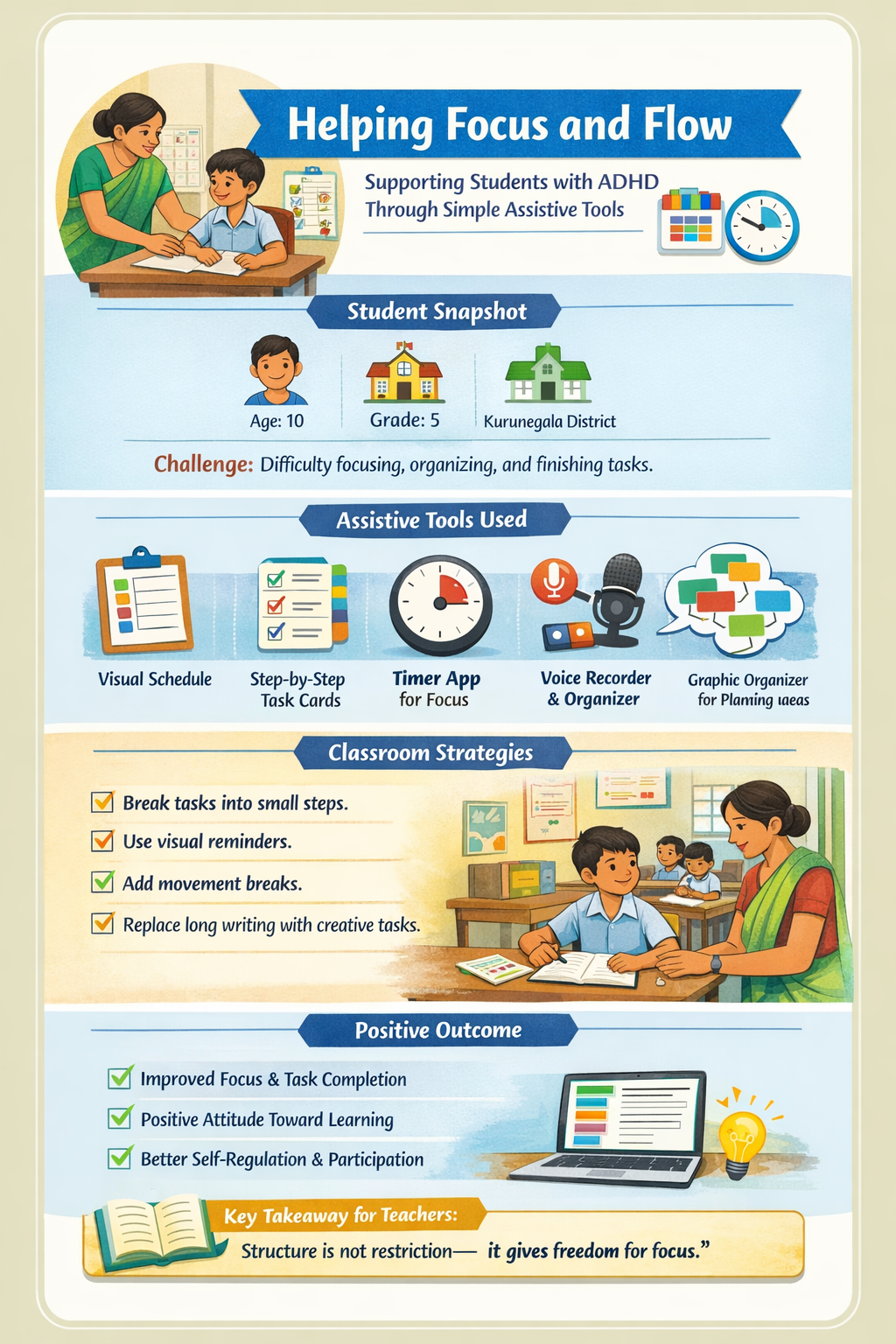
Sahan was an intelligent and curious student who struggled with attention and task organization rather than comprehension. Recognizing this, his teacher, Ms. Perera, implemented structured visual and practical supports to enhance his focus and independence. She introduced a color-coded visual schedule with icons to outline daily activities, enabling Sahan to monitor his progress throughout the day. For independent tasks, she provided laminated step-by-step cards and used a timer app to manage work and break intervals effectively. During assessments, Sahan was encouraged to use alternative methods such as science posters and voice-recorded explanations, supported by graphic organizers for idea planning. These tailored strategies significantly improved his engagement, confidence, and ability to demonstrate understanding, highlighting the impact of visual aids and flexible assessment methods in supporting diverse learning needs.
Assistive Technology in Action
1. Visual Structure & Routine (Low-Tech)
- Ms. Perera created a visual daily schedule on colored chart paper with hand-drawn icons for each subject.
- Sahan moved a small clip along the schedule to track progress, providing a clear sense of routine and predictability.
2. Task Management & Focus (Mid-Tech)
- Laminated task cards broke activities into smaller steps, allowing him to focus on one part at a time.
- A simple timer app on a classroom tablet reminded him when to pause or take necessary movement breaks.
3. Alternative Assessment (Mid-Tech)
- Sahan used a voice recording app to give oral explanations instead of lengthy written reports.
- Graphic organizers helped him plan and visualize his science posters before presenting them.
Outcome
- Within weeks, Sahan’s attention improved and he began completing work more confidently.
- The combination of structure and aids allowed him to show creativity without being limited by fatigue.
- His energy became an asset in the classroom rather than a distraction.
“When I started viewing assistive tools as supports, not shortcuts, Sahan’s learning came alive. His energy became an asset rather than a problem.”
— Ms. Perera, Grade 5 Teacher
Key Takeaways for Teachers
- Chunking: Break tasks into smaller, manageable parts using visual cues.
- Self-Regulation: Provide movement breaks or sensory options to manage energy.
- Predictability: Use clear routines to reduce anxiety and distraction.
- Flexibility: Offer creative formats like posters, oral responses, or models.
- Supportive AT: Use timers and recorders to bypass barriers like inattention.
Nirmal’s Story
Classroom Story
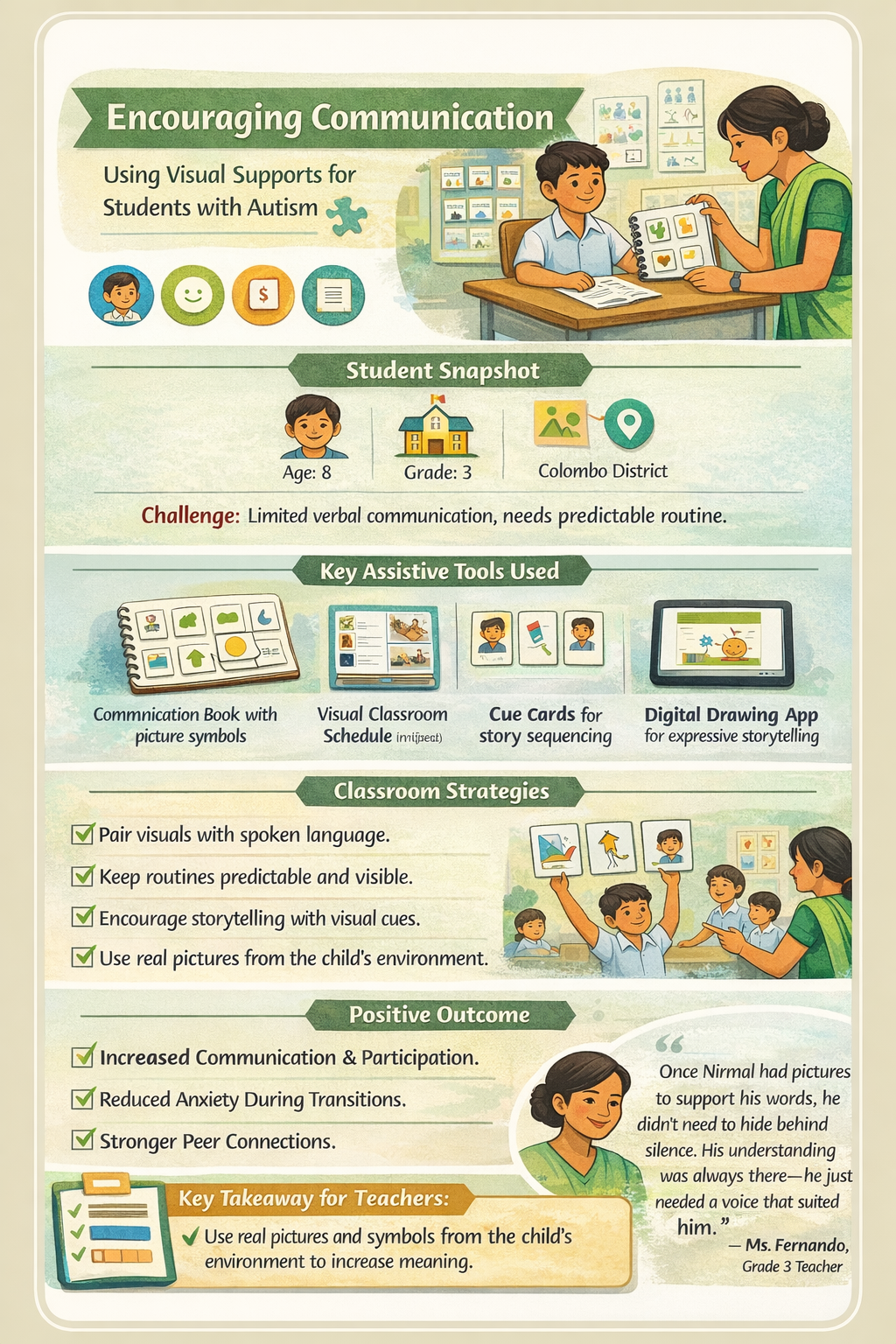
Nirmal was a quiet, observant student who communicated minimally during lessons. Noticing his strong visual learning style, his teacher, Ms. Fernando, introduced visual communication supports to enhance participation. She developed a personalized communication book with picture cards for common needs and a photo-based classroom schedule to make routines predictable. During storytelling, Nirmal used visual cue cards and a drawing app to create and sequence stories, demonstrating comprehension through visual expression and brief verbal explanations. Over time, these strategies reduced his anxiety and fostered greater confidence and interaction. The use of visual tools empowered Nirmal to communicate effectively and showcase his understanding beyond spoken language.
Assistive Technology in Action
1. Visual Communication (Low-Tech)
- Ms. Fernando created a communication book using a small notebook and laminated picture cards with symbols like "help," "finished," and "toilet."
- Velcro strips allowed Nirmal to point to or attach relevant pictures to express his needs.
2. Predictable Transitions (Low-Tech)
- A visual schedule was made using real photos of school spaces including his desk, the playground, and the library.
- This made daily transitions predictable, reducing anxiety during the school day.
3. Visual Storytelling & Expression (Mid-Tech)
- Nirmal used cue cards to sequence story events, leveraging his strong pattern-recognition skills.
- He used a basic drawing app on a school tablet to create his own story sequences for assessments.
Outcome
- Nirmal began using his communication book independently and interacting more confidently with classmates.
- The tools gave him both voice and choice, reducing the anxiety of being called upon.
- He successfully demonstrated rich understanding that words alone could not convey.
“Once Nirmal had pictures to support his words, he didn’t need to hide behind silence. His understanding was always there, he just needed a voice that suited him.”
— Ms. Fernando, Grade 3 Teacher
Key Takeaways for Teachers
- Environmental Cues: Use real pictures and symbols from the child’s actual environment.
- Hybrid Tools: Combine low-tech paper visuals with simple tablet apps for expression.
- Predictability: Keep routines visible through daily visual schedules.
- Visual Assessment: Let students demonstrate learning through drawings or photo sequences.
- Broaden "Voice": Recognize that pictures, gestures, and visuals are valid forms of communication.
Amaya’s Story
Classroom Story
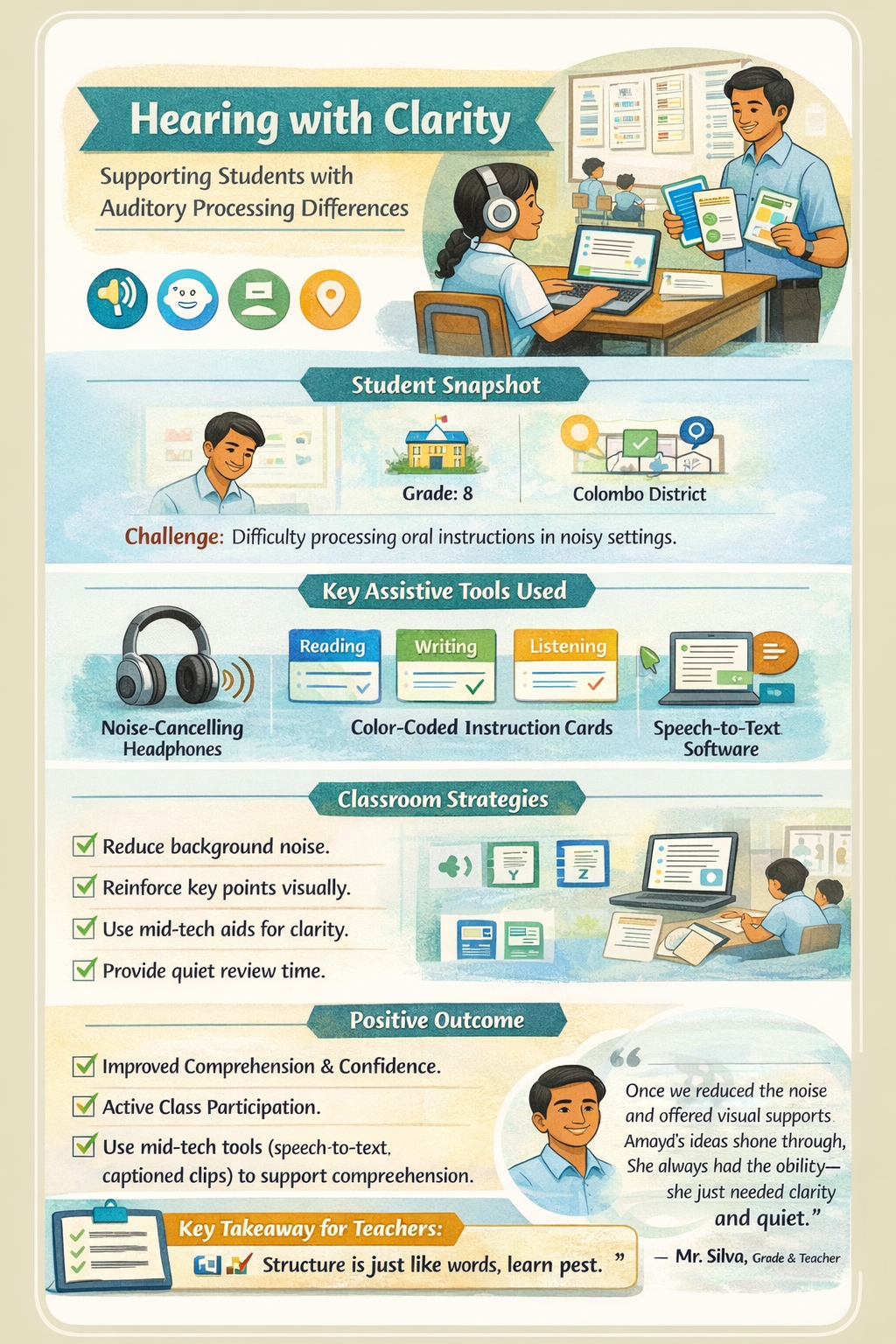
Amaya was a diligent student who struggled to follow oral instructions in her large, noisy classroom, leading to anxiety and reduced confidence. Her teacher, Mr. Silva, introduced a blend of low-cost and mid-tech strategies to enhance her access to spoken information. He repositioned her seating to minimize noise and provided noise-cancelling headphones for focused work. Color-coded instruction cards and captioned audio-visual materials supported her comprehension, while a speech-to-text tool enabled her to draft written work more effectively. During assessments, printed instructions and quiet review time further supported her needs. These interventions significantly improved Amaya’s focus, confidence, and academic performance, empowering her to participate more actively and communicate her ideas with clarity.
Assistive Technology in Action
1. Environmental & Auditory Support (Low/Mid-Tech)
- Strategic seating near the front of the class minimized background noise and echoes.
- She used noise-cancelling headphones during independent reading and writing tasks to maintain focus without auditory distractions.
2. Multi-Modal Instructions (Low/Mid-Tech)
- Mr. Silva used color-coded instruction cards: blue for reading, green for writing, and yellow for listening.
- Captioned audio clips and video summaries allowed her to review lessons at her own pace through an online platform.
3. Expressive & Assessment Aids (Mid-Tech)
- Amaya used speech-to-text tools to record her initial reflections before refining them into written work.
- For exams, she received printed copies of instructions to review quietly, bypassing the barrier of auditory processing.
Outcome
- Amaya’s confidence soared, and she even began volunteering to read aloud in class.
- The reduction of auditory stress allowed her to express complex ideas more clearly.
- Her test results improved significantly as instructions became accessible rather than obstacles.
“Once we reduced the noise and offered visual supports, Amaya’s ideas shone through. She always had the ability, she just needed clarity and quiet.”
— Mr. Silva, Grade 8 Teacher
Key Takeaways for Teachers
- Environmental Control: Identify and reduce noise barriers through seating and headphones.
- Visual Reinforcement: Always provide visual copies of instructions and key points.
- Digital Support: Use speech-to-text and captioned clips to aid comprehension.
- Self-Advocacy: Help students explain what auditory supports help them learn best.
- Confidence Building: Remember that reducing sensory stress allows ability to shine.


From handmade visual schedules and communication books to digital tools like speech-to-text and captioned audio, these examples show that effective AT does not depend on expensive devices but on creativity, cultural relevance, and a belief that every child deserves a way to succeed.
AT serves as a bridge between student potential and meaningful participation in learning. Through the use of simple, affordable, and context-appropriate tools, teachers can create classrooms that recognize and respond to every learner’s strengths. The examples and case studies featured on this page illustrate that inclusion does not rely on advanced technology or large budgets, but on creativity, adaptability, and understanding. By integrating low and mid-tech AT strategies into daily teaching, Sri Lankan educators can foster more equitable, engaging, and accessible learning environments. StepAhead encourages teachers to continue exploring, adapting, and sharing these practices taking one step at a time toward inclusive education for all.